
Preventing Dye Migration on Polyester
A white transfer that turns pink or gray is usually reacting to dye in the polyester below it. Learn how to test the garment, reduce heat exposure and choose a true dye-blocking transfer.
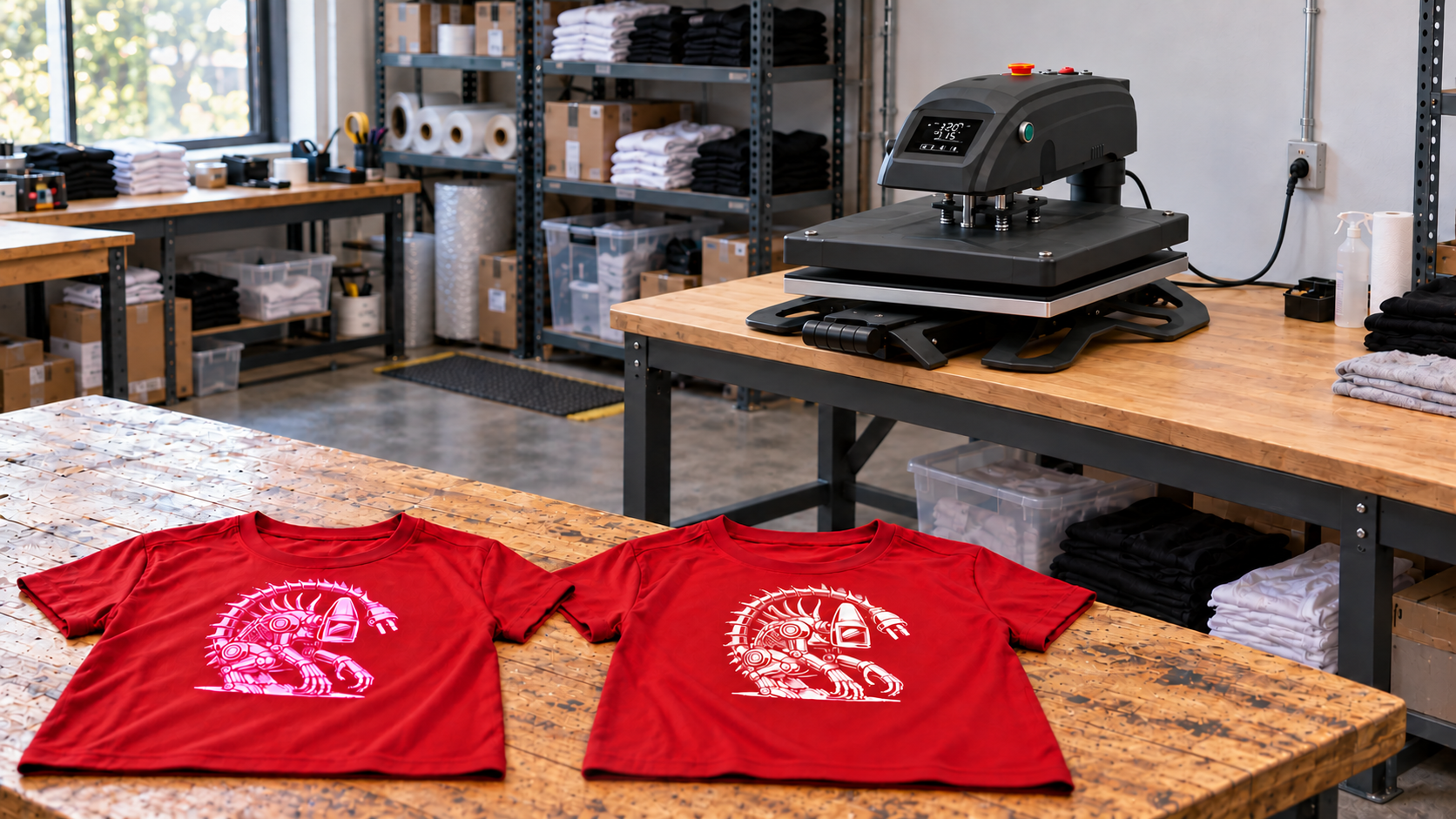
A white logo that looks clean when the press opens can turn pink, gray or muddy later. That color change is usually not bad artwork or a dirty platen. It is dye migration: color from the polyester garment has moved into the heat-applied transfer.
This problem is costly because the transfer may pass an immediate inspection, then change later. A dependable process combines garment identification, a compatible transfer, verified press conditions and enough test time to reveal delayed bleeding.
What Dye Migration Looks Like
Dye migration changes the color of the decoration rather than merely staining its surface. Common signs include:
- A white transfer becoming pink on a red shirt
- Light gray or white lettering taking on the garment color
- A camouflage or sublimated pattern becoming visible through the graphic
- One garment bleeding more than another from the same style
- A transfer looking correct when peeled but changing hours later
Do not confuse migration with scorching. Scorching changes the fabric’s appearance, often as a shiny rectangle or temporary dark area around the pressed region. Migration appears in the transfer itself as garment dye moves upward.
Why Polyester Dye Moves Into a Transfer
Polyester garments are colored with dyes that can become mobile again during heat application. Once activated, those dyes can enter a compatible ink, adhesive or film above the fabric. Dark garments and light transfers make the shift easiest to see.
The risk is not identical across every polyester blank. Dye chemistry, garment color, sublimation, manufacturing conditions and even dye lot can change the result. A spec sheet that says “100% polyester” is therefore a warning to test, not a complete prediction.
Heat exposure matters, but temperature is only one variable. Time, repeated presses and actual surface temperature also affect the result.
Which Garments Carry the Most Risk
Treat sublimated polyester as high risk. Sublimated jerseys, camouflage patterns and all-over-print performance garments already contain dyes intended to move under heat. Dark red, maroon, royal blue and black polyester also deserve extra caution, particularly under white or pale graphics.
Blended fabrics can also migrate. Not every dark polyester garment will bleed, which makes lot-specific testing more useful than assumptions.
Read the fiber and care labels before pressing. If the fabric is nylon rather than polyester, use a product approved for that substrate and review the separate guide to heat pressing nylon jackets.
How to Prevent Dye Migration on Polyester
Start With the Transfer Manufacturer’s Instructions
Select a transfer explicitly approved for the garment. “Works on polyester” does not always mean “blocks dye from sublimated polyester.” Those are different claims.
For example, Siser lists EasyWeed Sub Block for 100% and sublimated polyester at 265°F, medium pressure and 10 to 15 seconds. Transfer Express lists UltraColor Stretch with Blocker for sublimated polyester and provides its own time, temperature, pressure and peel sequence. These are product-specific examples, not interchangeable settings. Follow the current instructions supplied with the exact material and transfer batch you are using.
Use the Lowest Approved Heat Exposure
Lower-temperature products can reduce dye activation, but do not lower the setting below the transfer supplier’s approved range. An under-applied adhesive may look acceptable and then fail in washing.
Avoid unnecessary dwell time and repeated presses. Keep any required pre-press brief and purposeful; the guide to pre-pressing garments explains when moisture removal helps and when extra heat becomes another risk.
Controller temperature is only a setpoint. If results vary across the platen or from one job to another, test your heat press temperature with a suitable measurement method before changing the transfer recipe.
Choose a Real Dye-Blocking Product
A blocker is an engineered barrier between the garment dye and the visible transfer layer. It is the right starting point for sublimated polyester and other known high-bleed fabrics.
Do not assume that thicker white vinyl is automatically a dye blocker. Use a product specifically rated for dye blocking, then compare its appearance, flexibility and hand on the actual garment.
Pressure still matters. Too little contact can leave weak edges; excessive pressure can spread adhesive or mark the fabric. Set the machine according to the transfer instructions and use the heat press pressure guide to keep seams, zippers and raised panels from disrupting contact.
Test Before You Print the Order
Use a spare garment from the same style, color and dye lot whenever possible.
- Confirm the fiber content and whether the garment is sublimated.
- Verify the press temperature and set the specified pressure.
- Apply a light-colored test graphic using the exact production transfer.
- Follow the specified peel temperature and finishing procedure.
- Inspect the transfer immediately for adhesion, marks and color shift.
- Let the sample rest for at least 24 hours before approving the job.
- Wash-test when the order, garment or transfer is unfamiliar.
Migration can continue after the press opens. Record the garment style, color, lot, transfer name, settings and result.
Diagnose a Transfer That Changes Color
If a light graphic changes color, stop the run and isolate the affected pieces. Check the following in order:
- Wrong transfer: The product may be polyester-compatible but not dye-blocking.
- Excess heat: Confirm actual platen temperature rather than trusting the display alone.
- Too much dwell: Include pre-presses and finishing presses in total heat exposure.
- Garment variation: Compare style, color and dye-lot information.
- Incomplete barrier: A printed blocker may be too thin or inconsistent for that fabric.
- Contamination: Rule out a dirty cover sheet or platen, especially when discoloration is patchy rather than uniform.
Repressing a migrated transfer usually adds more heat and may worsen the color shift. Make one controlled change on a new test piece instead of stacking adjustments on the failed garment.
Build Dye Migration Control Into Production
Add a risk check to intake: fiber content, garment color, sublimated construction and transfer color. Flag light graphics on dark polyester before artwork approval.
Keep approved settings with the job, separate tested and untested blanks, and avoid mixing dye lots mid-run. When reorders arrive, test again; the same product code does not guarantee identical dye behavior forever.
Judge adhesion and migration separately. A transfer can be firmly bonded and still become discolored.
The Bottom Line
The best defense against polyester dye migration is a documented system: identify risky garments, use a transfer specifically rated for the substrate, minimize heat within the approved application window, verify the press and wait long enough for the test to tell the truth.
For more production guidance, browse the Alien Press Field Notes. When consistent temperature and pressure are limiting your workflow, review the Alien Press lineup to find a press suited to your shop.
Frequently Asked Questions
What is dye migration in heat transfer printing?
Dye migration occurs when color from a polyester garment moves into a heat-applied decoration, causing light graphics to become tinted or muddy.
Why did my white transfer turn pink on a red polyester shirt?
Heat likely reactivated red garment dye, which migrated into the white transfer. Use a compatible low-temperature dye-blocking product and test the exact garment.
Will lowering the heat stop dye migration?
Lower heat exposure can reduce risk, but the transfer must still reach its manufacturer-approved application conditions. High-bleed or sublimated fabric may require a true blocker.
How long should I wait when testing for dye migration?
Inspect immediately, then allow the sample to rest for at least 24 hours before approving production because the color shift can be delayed.
Can I fix a transfer after dye has migrated into it?
Usually not reliably. Repressing may activate more dye. Stop production, choose an appropriate blocker system and test a new garment.